
AI Clipping vs Human Clipping: Choosing the Right Workflow for Better Content
Where automation saves time, where human judgement protects the message, and how content teams can combine both without lowering quality
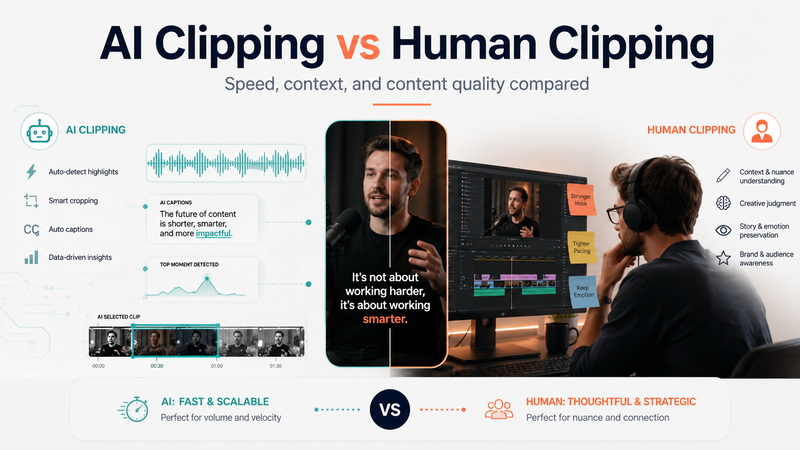

A content team uploads a 55-minute founder interview into an automated clipping tool. Within minutes, the software produces twelve vertical videos, complete with captions, speaker tracking, highlighted words, and performance scores.
On the surface, the job appears finished. Once the clips are reviewed, however, several problems become obvious. One begins halfway through an explanation. Another removes the sentence that qualifies a product claim. A third uses a confident statement as a hook, even though the speaker was describing an approach that had failed.
The software completed the production tasks it was designed to handle. What it could not fully judge was whether the selected moments made sense, represented the speaker fairly, or deserved to be published under the company’s name.
This is the central issue in the debate around automated and human clipping. The difference is not simply speed versus cost. It is the difference between recognising patterns in a recording and understanding what those patterns mean to a particular audience.
What do AI clipping and human clipping mean?
AI clipping is the use of automated software to analyse long-form audio or video, identify possible highlights, create shorter clips, generate captions, reframe footage, and prepare files for platforms such as TikTok, Instagram Reels, YouTube Shorts, and LinkedIn.
Human clipping involves a person reviewing the full recording, finding ideas that can stand independently, selecting accurate start and end points, protecting the speaker’s meaning, and shaping the final asset for a defined audience and business purpose.
A useful comparison of AI Clipping vs Human Clipping must therefore go beyond asking which option is faster. AI can complete repetitive production tasks efficiently. Human reviewers are generally better at understanding context, nuance, brand risk, audience relevance, and the consequences of publishing a misleading edit.
The two approaches solve different parts of the same problem.
The decision most teams actually need to make
Most businesses do not need to choose between a completely automated workflow and a completely manual one.
They need to decide which parts of the process can be handled safely by software and which decisions should remain under human control.
AI is usually effective for:
Transcribing long recordings
Searching for keywords and questions
Detecting silence and repeated phrases
Suggesting possible timestamps
Generating draft captions
Tracking active speakers
Reframing horizontal footage
Preparing multiple aspect ratios
Creating rough variations for review
Human involvement becomes more important when the clip:
Represents a founder, executive, or expert
Contains technical or regulated information
Discusses pricing, guarantees, or product claims
Addresses a sales objection
Includes a customer story
Covers a sensitive opinion
Needs to match a particular brand voice
Supports a launch, campaign, or commercial objective
For most professional content teams, a hybrid workflow offers the best balance. Automation reduces repetitive work, while people remain responsible for meaning, accuracy, and final approval.
How AI clipping works
Automated clipping platforms differ in their features, but the underlying workflow is usually similar.
1. The recording is transcribed
The platform converts the spoken conversation into searchable text. Some tools also identify different speakers and divide the transcript into sections.
This makes it easier to search long recordings for product names, topics, questions, objections, or recurring phrases. Problems can appear when the recording includes accents, industry terminology, brand names, or several speakers talking over one another.
2. Potential highlights are detected
The software searches for signals that may indicate an interesting moment. These can include:
Changes in vocal energy
Emotional language
Questions followed by direct answers
Concise statements
Pauses before or after a key sentence
Keywords selected by the user
Patterns associated with popular short videos
These signals are useful for creating a shortlist. They do not prove that a section is complete or valuable.
3. Start and end points are selected
The tool creates clip boundaries based on sentence structure, transcript segments, pauses, or a preferred duration.
This is one of the most common sources of weak automated clips. A sentence may be grammatically complete while still depending on an earlier question, example, or explanation.
4. The footage is reformatted
The system may convert a horizontal podcast or webinar into a vertical layout. It can follow the active speaker, create a split screen, or move the crop between participants.
This task is repetitive and usually suitable for automation, although the final framing still needs review.
5. Captions and visual treatments are added
The platform may generate subtitles, highlight selected words, apply colours, and add a headline.
The output can look polished even when the selected moment lacks context. Visual quality should not be confused with editorial quality.
6. Clips may receive predicted scores
Some tools assign scores based on estimated engagement, delivery, language, or similarity to previously successful content.
These scores can help a team prioritise its review. They cannot determine whether the clip is accurate, useful to the company’s audience, or safe for the brand to publish.
How human clipping works
Human clipping begins with a different question. Instead of asking which parts of the recording can be made shorter, the reviewer asks which ideas are worth publishing.
1. The reviewer understands the objective
Before selecting clips, the reviewer needs to know what the content is expected to accomplish.
The goal may be to:
Promote the full episode
Build the speaker’s authority
Explain a product or service
Answer a recurring sales question
Support a launch
Educate existing customers
Generate enquiries
Drive traffic to a related page
The intended outcome changes which moments deserve attention.
2. The complete discussion is reviewed
A human reviewer can consider facial expressions, hesitation, humour, confidence, disagreement, and the relationship between speakers.
These details often determine whether a moment feels genuine, unclear, sensitive, or potentially misleading when removed from the original conversation.
3. A complete idea is identified
The reviewer finds enough material for a new viewer to understand:
What is being discussed
Why the point matters
What the speaker is saying about it
What conclusion or lesson follows
A strong sentence may provide the opening, but the final clip should contain more than an isolated statement.
4. The opening is improved without distorting the point
A human editor may remove a slow introduction, begin with a later sentence, or add a clear headline. The opening should create interest while accurately representing the explanation that follows.
5. The edit is adapted to the account
The right pacing and visual treatment depend on the speaker, platform, audience, and brand.
A software founder speaking to decision-makers may need a restrained edit with accurate captions. An entertainment podcast may support faster pacing and more visual movement. A financial adviser may require careful context and minimal headline exaggeration.
6. The final asset is checked
A human review should confirm:
The clip begins at the right point
The conclusion is complete
Captions are accurate
Names and terminology are correct
Claims remain properly qualified
The speaker’s meaning has not changed
The visual treatment suits the brand
The call to action matches the purpose
Human clipping takes longer because more editorial decisions are being made. That additional time is valuable when mistakes could affect trust, reputation, or sales.
A practical example from one recording
Imagine a founder is discussing customer onboarding during a business podcast.
At one point, the founder says:
“That was when we stopped offering unlimited onboarding calls.”
An automated tool may identify this sentence because it is concise, confident, and slightly surprising. It may generate a 30-second clip that begins shortly before the statement and ends after the next sentence.
The clip sounds interesting, but the viewer does not know why the company offered unlimited calls, what problem the policy caused, or what replaced it.
A human reviewer may begin earlier in the discussion.
The complete section explains that customers kept requesting training calls because the product setup was confusing. The company introduced unlimited onboarding as a temporary solution, but support costs increased while the underlying problem remained. The team eventually redesigned the setup flow, created a structured training programme, and reduced the need for repeated calls.
The automated version contains an attractive hook.
The human-selected version contains a clear business lesson.
This distinction matters because the second clip is more likely to generate useful discussion, establish the founder’s credibility, and help viewers understand the reasoning behind the decision.
Where AI clipping performs well
Large content archives
A company with hundreds of webinars, podcasts, or training videos can use transcription and search tools to locate discussions about particular topics quickly.
Initial content discovery
AI can produce a shortlist of possible moments, saving a reviewer from searching every second of every recording manually.
Draft captions
Automatic captions reduce production time, provided they are reviewed for names, figures, technical terms, and punctuation.
Speaker tracking and reframing
Automated cropping can handle the basic conversion from horizontal footage to vertical layouts.
Silence removal
Software can identify long pauses and produce a tighter rough cut before the final pacing is reviewed.
Creating multiple versions
AI tools can generate different lengths, layouts, or openings for testing.
Supporting small teams
A company without a dedicated editing department can use automation to complete basic production tasks and reduce the time required for each recording.
These are meaningful advantages. The problem begins when the software’s shortlist is treated as the final editorial decision.
Where human clipping performs better
Context
A person can recognise when a sentence depends on the original question, a previous example, or the tone of the wider discussion.
Audience relevance
An entertaining moment may have little connection to the company’s customers. A human can decide whether the clip addresses a real question, concern, or objective.
Brand voice
Different companies should not all receive the same caption style, pacing, headline structure, and visual treatment.
Technical accuracy
Human reviewers are more likely to notice incorrect product names, job titles, figures, industry terms, or qualifications.
Speaker intent
A person can recognise when an edit makes the speaker appear more certain, aggressive, emotional, or controversial than they were in the original recording.
Sensitive content
Healthcare, legal, financial, employment, and other regulated subjects require careful handling because removed context can change the meaning of a claim.
Feedback and refinement
A human team can understand why a client rejected a clip and apply that insight to future work.
Pros and cons of AI clipping
Advantages
Faster first-pass production
Lower initial cost
Consistent technical formatting
Searchable transcripts
Rapid draft generation
Easy aspect-ratio conversion
Useful support for high-volume publishing
Reduced time spent on repetitive tasks
Disadvantages
Incomplete clip boundaries
Weak understanding of context
Caption and terminology errors
Generic visual templates
Misleading automated headlines
Limited knowledge of the company’s audience
Unreliable performance predictions
Risk of changing the speaker’s intended meaning
AI clipping is most useful when the output is treated as a draft that still requires approval.
Pros and cons of human clipping
Advantages
Better preservation of context
Stronger editorial judgement
More accurate brand alignment
Safer handling of technical subjects
Better understanding of audience needs
Greater control over structure and pacing
More reliable final quality
Better response to detailed feedback
Disadvantages
Higher production cost
Longer turnaround time
Possible bottlenecks
Quality differences between reviewers
More training and brand guidance required
Inefficient use of time when repetitive work is completed manually
A fully manual workflow may protect quality but become too slow or expensive for companies publishing at scale.
Real business use cases
Podcast networks
AI can transcribe episodes, identify possible timestamps, and prepare rough vertical versions. Human producers can then select moments that accurately represent the host, guest, and discussion.
Founder-led companies
Automation can reduce the time required to process monthly founder interviews. Human reviewers can select ideas related to customer concerns, leadership, hiring, product decisions, and market positioning.
Software companies
AI can locate discussions about particular features, setup questions, and customer objections. Human editors can verify that the explanations are accurate enough for sales material, product pages, and customer education.
Marketing agencies
Automation can handle repetitive formatting across several accounts. Human teams can maintain a distinct voice, creative style, and audience focus for each client.
Conferences and events
Transcription can make hours of keynote and panel footage searchable. Human reviewers can select complete insights rather than isolated applause lines or emotional reactions.
Technical and regulated businesses
AI can assist with transcription and rough cutting, while final selection and approval remain human-led because errors can create reputational or compliance risks.
Common mistakes when comparing the two approaches
Comparing price without including correction time
An inexpensive automated clip is not good value when the internal team must repair the captions, restore missing context, change the crop, and rewrite the headline.
Treating predicted scores as proof
A high engagement score does not prove that the clip is accurate, commercially relevant, or suitable for the brand.
Publishing without final review
Public-facing clips should be checked before publication, particularly when they represent a founder, product, professional opinion, or customer claim.
Making humans complete every repetitive task
Manual transcription, basic reframing, silence removal, and draft caption timing consume time that could be used for more valuable editorial decisions.
Applying the same workflow to every recording
A casual entertainment podcast carries different risks from a financial interview, technical webinar, or healthcare discussion.
Measuring performance through views alone
Watch time, saves, relevant comments, website visits, enquiries, and qualified conversations often provide a better measure of value.
Clipping Agency’s Decision Weight Framework
Clipping Agency evaluates each part of the workflow according to the weight of the decision.
Light decisions
These tasks are repetitive, easy to verify, and suitable for automation:
Transcription
Silence detection
Draft captions
Speaker tracking
Format conversion
Initial timestamp suggestions
Shared decisions
These tasks benefit from automation but require human review:
Clip boundaries
Headlines
Caption emphasis
Pacing
Supporting visuals
Platform variations
Heavy decisions
These decisions affect meaning, trust, and business value, so they should remain human-owned:
Whether the moment deserves publication
Whether enough context remains
Whether the speaker is represented fairly
Whether claims are accurate
Whether the asset fits the brand
Whether the clip supports a real objective
The Decision Weight Framework prevents teams from automating a decision simply because software can produce an answer.
The heavier the consequence of getting something wrong, the more human involvement the decision requires.
Frequently asked questions
Is AI clipping cheaper than human clipping?
AI usually reduces first-pass production costs. Total costs can increase when a team must correct weak selections, inaccurate captions, poor framing, or missing context.
Can AI find viral moments?
AI can recognise patterns associated with attention, but it cannot guarantee performance or ensure that the clip attracts the right audience.
Does every automated clip need human review?
Public-facing branded content should receive human review. The depth of review can vary depending on the subject and level of risk.
Can human editors use AI tools?
Yes. Skilled editors often use AI for transcription, captioning, silence removal, reframing, and initial content discovery.
Which option is better for technical content?
A human-led or hybrid workflow is generally more reliable because technical content depends on precise terminology, qualifications, and context.
Is AI clipping suitable for social media?
Yes, particularly for rough drafts, simple recordings, and high-volume testing. Final approval remains important when the content represents a company or professional.
How should a business test a clipping service?
Provide one representative recording and request a small sample batch. Review selection quality, context, caption accuracy, brand fit, platform suitability, and revision handling.
Choosing a workflow that can scale
AI clipping is useful when a company needs to process more footage, reduce repetitive production work, and create initial options quickly.
Human clipping becomes more important when context, accuracy, brand voice, and commercial relevance matter.
For most businesses, the strongest answer is a hybrid workflow. Software accelerates discovery and formatting, while people remain responsible for meaning, strategy, and final approval.
Clipping Agency helps brands, creators, podcast companies, and marketing teams build this balance. A practical starting point is to test one representative recording, compare automated suggestions with human-selected moments, and examine which version communicates a clearer and more useful idea.
The best workflow is not the one that produces the most clips in the shortest time. It is the one that consistently produces content the business is confident to publish.

Comments
No comments yet. Be the first to comment!