
Content Clipping: How to Build More Value From Every Recording
A practical guide to selecting better moments, protecting context, and turning long-form conversations into useful marketing assets
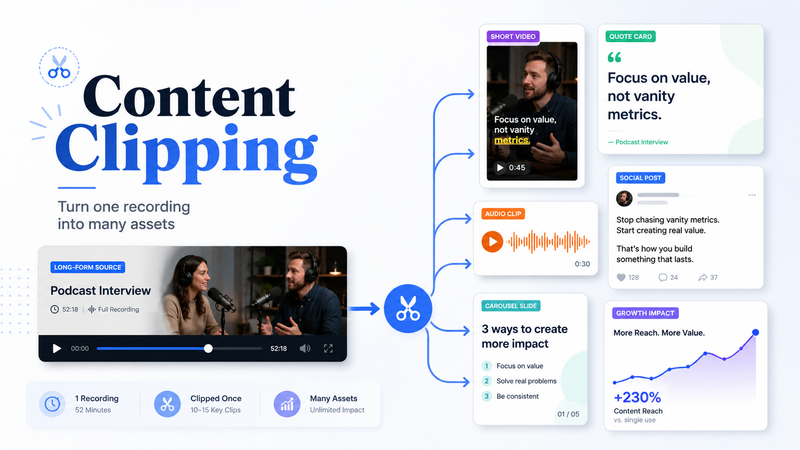

A company may spend several hours preparing and recording a podcast, webinar, interview, or product demonstration, only to publish the complete video once and move on to the next item on the calendar. The recording remains available, but most of the ideas inside it are never used again.
That is a missed opportunity. A single conversation may contain a useful customer example, an answer to a common objection, a practical process, an opinion about the market, and a lesson drawn from experience. Each of those moments can support a different stage of the customer journey when it is selected and packaged properly.
Content clipping creates a structured way to recover that value. Instead of treating the original recording as one finished piece, the business treats it as a source containing several ideas that can be developed into focused assets.
What is content clipping?
Content clipping is the process of identifying useful moments inside long-form recordings and turning them into shorter, self-contained pieces of content.
The source material may include:
Podcasts
Webinars
Founder interviews
Livestreams
Product demonstrations
Conference sessions
Customer education videos
Online courses
Long-form YouTube videos
Recorded team or expert discussions
Professional Content Clipping involves more than cutting a video into shorter sections. The reviewer must understand the conversation, identify where a complete idea begins and ends, preserve the context needed for accuracy, and decide how the final asset should be used.
A strong clip should make sense to someone who has never watched the original recording. The viewer should understand the subject, receive a useful point, and reach a natural conclusion without needing additional explanation.
The practical answer for businesses
Content clipping helps a company publish more consistently by making better use of recordings it has already created.
Consider a 50-minute conversation with the founder of a software company. During the recording, the founder may explain:
Why customers struggle during implementation
How the onboarding process has changed
Which product feature is frequently misunderstood
What the company learned from an early pricing mistake
How smaller teams can measure progress
Why a popular industry assumption is misleading
The complete interview is one asset. The individual explanations can become several more.
The onboarding section may become a customer education video. The pricing lesson may work as a founder-led LinkedIn post. The misunderstood feature may support a sales follow-up email. The industry opinion may become a short-form video designed to start a useful discussion.
The value comes from separating ideas according to purpose, not simply producing as many clips as possible.
How the content clipping process works
A reliable clipping system connects strategy, editorial selection, production, review, and distribution. Starting with an editing template usually leads to weak clips because the team has not yet decided what deserves to be published.
Step 1: Define what the clipped content should achieve
Before selecting moments, decide what the content needs to accomplish.
Possible objectives include:
Educating potential customers
Building founder authority
Promoting a podcast or webinar
Answering sales objections
Supporting a product launch
Increasing publishing consistency
Generating enquiries
Directing viewers towards a longer resource
Creating material for customer support or onboarding
The objective affects which moments are useful.
A clip intended for sales may explain a recognisable customer problem and provide a practical answer. A thought leadership clip may present an informed opinion supported by experience. A podcast promotion clip may use a memorable exchange that creates interest in the full episode.
Without a defined purpose, teams often choose moments because they sound energetic. The result may attract brief attention without supporting the company’s wider goals.
Step 2: Review the complete recording
Transcripts and automated tools can make long recordings easier to search, but they should not make every editorial decision.
A transcript captures the words. It may not show whether the speaker’s delivery was confident, emotional, humorous, hesitant, or visually engaging. A section that looks ordinary in writing may work because of the speaker’s expression or timing.
During the review, look for moments containing:
Direct answers to common questions
Specific examples
Useful comparisons
Customer objections
Strong opinions supported by reasoning
Lessons from mistakes
Repeatable processes
Clear explanations
Memorable stories
Questions the audience already asks
For each possible clip, record the subject, approximate starting point, ending point, intended audience, and potential use. This creates an editorial map rather than a loose list of timestamps.
Step 3: Find the complete idea
One memorable sentence is not always enough to create a useful clip.
Suppose a founder says:
“We changed the entire offer after that meeting.”
The statement creates curiosity, but a new viewer does not know what the meeting was about, what problem existed, or what changed afterwards.
A complete clip would normally include:
The situation before the meeting
The information that challenged the original approach
The decision the company made
The result or lesson
The editor can remove repetition, filler words, and unnecessary pauses. The context that gives the statement meaning should remain.
This is one of the clearest differences between producing shorter videos and creating content that can stand on its own.
Step 4: Strengthen the opening
The opening should establish the subject quickly without turning the speaker’s point into clickbait.
Useful openings often introduce a mistake, question, result, or disagreement:
“The first version of our onboarding process created more confusion than it solved.”
“Most companies measure webinar success using the wrong numbers.”
“Customers misunderstand this feature for one specific reason.”
“We changed our pricing after hearing the same objection three times.”
When the original speaker reaches the point slowly, the editor may begin with a later sentence or add a concise on-screen headline.
The opening should accurately represent the content that follows. A dramatic promise that the clip cannot support may increase initial attention, but it reduces trust.
Step 5: Edit around the message
Good editing helps the audience follow the idea. It should not compete with the person delivering it.
Production may include:
Removing long pauses
Tightening repeated phrases
Improving audio
Reframing horizontal footage vertically
Adding accurate captions
Switching between speakers
Highlighting important terms
Adding relevant screenshots
Including product footage
Applying brand fonts and colours
Preparing alternate aspect ratios
The creative treatment should suit the subject and audience.
A financial consultant may need clear captions and limited visual movement. A creator reviewing equipment may benefit from product footage and quicker changes. A founder speaking to business decision-makers may need a restrained edit that keeps attention on the explanation.
The production workflow can be consistent behind the scenes without forcing every speaker into the same visual template.
Step 6: Review accuracy and context
Every clip should pass through quality control before publication.
Check:
Caption accuracy
Names and job titles
Figures and claims
Product terminology
Necessary qualifications
Speaker meaning
Audio quality
Framing
Brand consistency
Opening and ending
Platform dimensions
This becomes especially important when the content covers finance, healthcare, law, technology, or regulated services.
A polished clip is not useful when it removes a qualifying statement or changes how the speaker’s words are understood.
Step 7: Adapt the asset for its destination
The same central idea may work on several platforms, but the exact presentation often needs to change.
LinkedIn may support a longer business explanation. YouTube Shorts may work well when the clip answers a clearly phrased question. TikTok may require the subject to become obvious earlier. Instagram may need a strong cover and a visually clean first frame.
Platform adaptation may involve changes to:
Duration
Opening text
Caption position
Cover design
Description
Call to action
Visual crop
Supporting post copy
The message remains consistent while the packaging reflects how people use each platform.
Step 8: Use performance to improve future selections
The clipping team should know what happens after publication.
Useful signals include:
Average watch time
Completion rate
Saves
Shares
Relevant comments
Profile visits
Website clicks
Enquiries
Qualified leads
Views provide useful context, but they do not always represent business value. A clip watched by 2,000 relevant decision-makers may contribute more than one seen by a much larger but unrelated audience.
Performance should influence future topic selection, clip length, openings, formats, and distribution decisions.
Real business uses for content clipping
Turning a webinar into sales and education assets
A software company records a product webinar that includes a demonstration, implementation advice, customer questions, and pricing objections.
The recording can become:
LinkedIn product videos
Sales follow-up clips
Landing-page explanations
Customer onboarding material
Internal training content
Product support videos
The webinar continues supporting several departments after the live session has ended.
Building a founder’s public profile
A founder can participate in one structured interview each month. The conversation may cover product decisions, customer behaviour, hiring lessons, leadership challenges, and changes in the market.
The recording provides enough material for consistent publishing without asking the founder to film new videos every day.
Adding value to podcast production
A podcast company can deliver the full episode alongside a package of clips for the host, guest, and brand channels.
The client receives more promotional material, while the production company adds a recurring service that increases the value of every recording.
Extending the life of event content
Keynotes and panel discussions can become speaker highlights, educational videos, sponsor assets, quote graphics, and promotional material for future events.
The footage becomes an active publishing library instead of remaining in an archive.
Supporting consultants and professional firms
A consultant can turn interviews, presentations, and recorded workshops into clips explaining their methods, correcting misconceptions, and answering recurring client questions.
Prospective clients gain a clearer understanding of the consultant’s thinking before arranging a call.
Advantages of content clipping
A well-managed clipping process can:
Extend the useful life of recordings
Reduce the need for constant filming
Improve publishing consistency
Create assets for several channels
Support sales and customer education
Build trust through useful explanations
Lower the cost per published asset
Test several topics from one recording
Give strong ideas more opportunities to reach people
The main benefit is not greater content volume. It is making deliberate use of expertise that the business has already recorded.
Limitations to consider
Content clipping also has practical limits:
Weak recordings may contain few useful moments
Missing context can create misleading clips
Excessive editing can make speakers feel unnatural
Incorrect captions can damage credibility
Repetitive subjects may tire the audience
One style may not suit every platform
Publishing more without a clear purpose can create noise
Clipping improves the use and distribution of good source material. It cannot manufacture useful ideas when the original recording lacks substance.
Common content clipping mistakes
Forcing the same number of clips from every recording
Some recordings may contain ten useful ideas. Others may contain only three.
A fixed quota often produces repetitive clips, incomplete thoughts, and weak sections that should not have been published.
Allowing software to control selection
AI can assist with transcription, captions, reframing, and timestamp suggestions. It may still miss nuance, context, commercial relevance, and brand risk.
Human editorial review remains necessary.
Selecting moments for drama alone
An emotional statement may attract attention, but the clip should still communicate something useful.
Attention without substance rarely builds lasting trust.
Applying one template to every speaker
A standard workflow can improve efficiency. The finished content should still reflect the speaker, brand, topic, platform, and audience.
Separating production from performance data
Editors and reviewers make better decisions when they know which clips produced watch time, saves, relevant comments, website visits, and enquiries.
Without feedback, the process cannot improve.
Clipping Agency’s One-Idea Asset Test
Clipping Agency evaluates every potential clip through four questions.
Is there one clear idea?
The moment should contain a specific answer, lesson, example, process, comparison, or opinion.
Can the idea stand independently?
A new viewer should understand it without watching the complete recording.
Is there a defined audience?
The team should know which customer question, problem, interest, or ambition the clip addresses.
Does the asset have a useful role?
The clip should have a clear purpose, such as education, authority building, sales support, discussion, website traffic, or enquiries.
The One-Idea Asset Test prevents teams from investing editing time in moments that are available but not genuinely publishable.
Frequently asked questions
How long should a content clip be?
There is no universal duration. Many clips fall between 20 and 90 seconds, although detailed explanations may require more time. The idea should determine the final length.
Can audio-only podcasts be clipped?
Yes. Audio can be combined with captions, speaker images, waveforms, screenshots, supporting footage, or simple motion graphics.
How many clips can come from one recording?
The number depends on the quality and structure of the source. A focused interview may provide several strong clips, while an unfocused conversation may contain only a few.
Can AI handle content clipping?
AI can support transcription, captioning, reframing, and possible moment detection. Human review remains important for context, accuracy, brand fit, and audience relevance.
Should every clip include a call to action?
No. Some clips should educate, establish trust, or encourage discussion. Add a call to action when it naturally supports the purpose of the asset.
Can one clip be published on several platforms?
Yes, although the opening, duration, captions, cover, description, and call to action may need to be adapted.
Can content clipping improve search visibility?
Yes. Clips that answer clear questions may appear in platform searches and lead viewers towards related articles, service pages, newsletters, or complete recordings.
Start with one recording and one purpose
Many businesses already have useful material sitting inside podcasts, webinars, interviews, demonstrations, and event recordings. What they lack is a reliable method for identifying the strongest ideas and directing each one towards a meaningful outcome.
Clipping Agency helps brands, creators, and marketing teams turn long recordings into focused assets without losing context or accuracy.
A practical starting point is to choose one strong recording, define what the resulting content should achieve, and build a small test batch around the clearest answers, examples, and lessons. Review the results before increasing volume.

Comments
No comments yet. Be the first to comment!