
How Content Clipping Turns One Recording Into a Growth System
A practical guide to selecting, editing, and distributing the strongest ideas from podcasts, webinars, interviews, and long-form videos.
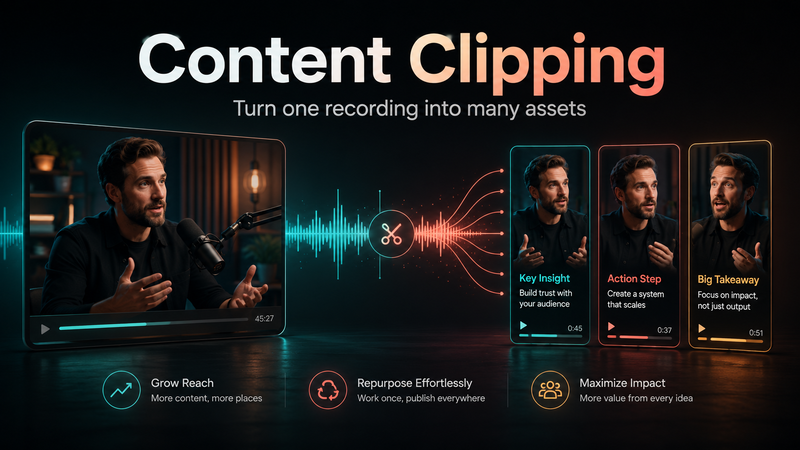

A business can spend hours planning, recording, and editing a podcast, webinar, interview, or founder conversation, only for the finished content to receive attention once and then disappear into an archive.
That recording may contain several strong ideas, but most viewers will never reach all of them. A useful explanation might appear halfway through the conversation. A convincing customer story may sit near the end. A clear answer to a common objection may receive little attention because it was never presented as a separate piece of content.
Content clipping solves this problem by treating a long-form recording as a source of individual ideas rather than a single finished asset. The strongest moments can be selected, edited, and distributed as short-form videos that continue working after the original recording has been published.
The value comes from choosing the right moments, not simply producing the highest number of clips.
What content clipping means
Content clipping is the process of selecting useful moments from long-form material and turning them into shorter, self-contained pieces of content.
The source material may include:
Podcasts
Interviews
Webinars
Livestreams
YouTube videos
Founder conversations
Online courses
Conference sessions
Panel discussions
Customer education recordings
Professional Content Clipping includes both editorial selection and video production. The team must decide which moments deserve to stand alone, how much context the audience needs, and how each clip should be edited for the platform where it will appear.
A strong clip should make sense to someone who has not watched the original recording. It should communicate one clear idea, preserve the speaker’s meaning, and give the viewer a reason to keep watching.
Why clipping is useful for businesses
Businesses often assume that consistent social content requires constant filming. That approach can be difficult when the people appearing on camera are also running companies, managing clients, selling services, or delivering specialist work.
Content clipping creates another option. One focused recording can provide several assets for different audiences and publishing dates.
A 50-minute interview with a company founder might contain:
A response to a common customer question
A lesson from a failed project
A useful explanation of the company’s process
A strong opinion about an industry trend
A comparison between two approaches
A story about an important business decision
A practical mistake the audience should avoid
Each idea can become its own short-form video. The founder records once, while the business gains a library of content that can support social media, email, sales, thought leadership, and customer education.
The purpose is not to make one recording look endlessly reusable. It is to identify the parts that are genuinely valuable enough to publish separately.
How the content clipping process works
A reliable clipping workflow usually follows several clear stages.
1. Define the purpose before reviewing the recording
The clipping team should understand why the original content was created.
A webinar designed to generate product enquiries needs a different approach from a podcast intended to build a founder’s reputation. A livestream for an existing community may contain entertaining reactions, while an industry interview may offer stronger educational material.
The initial brief should explain:
Who the intended audience is
Which topics matter most
Where the clips will be published
Whether the goal is reach, trust, education, leads, or sales
Which services, products, or campaigns are relevant
Which claims, subjects, or phrases should be avoided
Without this context, an editor may select moments that sound interesting but have little value for the business.
2. Review the full source material
Transcripts and automated tools can speed up the review process, but they should not replace editorial judgement.
A transcript may reveal useful phrases, although it does not always show whether the speaker’s delivery is confident, emotional, humorous, or clear enough for a short video. Some valuable moments appear ordinary in writing but become compelling when heard and seen.
The reviewer should look for sections containing:
Specific answers
Practical examples
Strong but supported opinions
Useful frameworks
Customer objections
Important misconceptions
Memorable stories
Searchable questions
Clear lessons from experience
The best moments normally focus on one subject rather than moving between several loosely related ideas.
3. Make sure the clip is complete
Many weak clips begin too late or end too early.
If the speaker has already introduced the topic before the clip starts, the viewer may not understand the discussion. If the video ends before the conclusion, the viewer receives information without a useful outcome.
A complete clip normally contains:
A clear opening
Enough context for a new viewer
The central lesson, story, or explanation
A natural conclusion
The editor can remove repetition, filler words, and unnecessary pauses, but the original meaning should remain accurate.
4. Improve the opening without manufacturing a false hook
The first few seconds should explain why the viewer should care.
A useful opening might be:
“The most expensive mistake we made when hiring our first sales team was…”
“Most companies measure short-form video using the wrong metric.”
“There are three reasons your webinar is not creating leads.”
“A client asked whether they needed to publish every day. The answer was no.”
The opening does not need exaggerated language. It needs a clear subject and a reason to continue.
When the original recording starts slowly, the editor can add a short headline or begin with a later sentence, provided the rearrangement does not change the speaker’s meaning.
5. Edit for understanding
Good short-form editing should make the idea easier to follow.
The process may include:
Removing long pauses and repeated phrases
Reframing horizontal footage for vertical platforms
Improving audio consistency
Adding accurate captions
Switching between speakers
Highlighting important phrases
Adding relevant screenshots or supporting visuals
Including restrained brand elements
Creating different versions for separate platforms
The style should match the subject and audience. A financial adviser speaking on LinkedIn may need clean captions and limited animation. A creator publishing on TikTok may benefit from quicker pacing and more visual movement.
The editing should support the message rather than compete with it.
6. Check context and accuracy
Shortening a conversation can accidentally remove important qualifications or alter the meaning of a statement.
Before publishing, the team should confirm that:
The speaker’s position remains accurate
Necessary context has not been removed
Names, figures, and job titles are correct
Captions match the spoken words
Brand guidelines have been followed
The beginning and ending feel complete
The format suits the intended platform
The exported file meets quality standards
This review is especially important for finance, health, legal, software, and other subjects where a missing detail can create confusion.
7. Adapt the clip for distribution
The same central idea can often be used on several platforms, but the presentation may need to change.
LinkedIn may support a longer explanation with restrained captions. TikTok may require quicker context. YouTube Shorts may perform well when the clip answers a clear searchable question. Instagram may need a strong cover image and a visually clean opening frame.
Platform adaptation may include changes to:
Length
Caption position
Opening text
Cover image
Description
Call to action
Visual framing
Branding
The idea remains consistent while the packaging reflects the platform.
8. Use performance to guide the next batch
A clipping strategy should improve over time.
Useful performance signals include:
Average watch time
Completion rate
Saves
Shares
Comments
Profile visits
Website clicks
Enquiries
Qualified leads
Views are useful, but they are not always the most important result. A clip with a smaller audience may still be more valuable if it attracts decision-makers, generates sales conversations, or answers an important customer question.
Three questions Clipping Agency uses to assess a potential clip
From Clipping Agency’s perspective, every potential clip should pass three tests before editing begins.
1. Does it make sense without the full recording?
The viewer should not need the previous ten minutes of conversation to understand the point. If too much background is missing, the section may need a different beginning or may not be suitable as a standalone clip.
2. Does it matter to the intended audience?
A moment can be entertaining without being useful. The subject should connect to a real audience interest, problem, question, or ambition.
3. Does it support a clear content or business objective?
The clip should have a role. It may build authority, answer an objection, support a campaign, educate customers, generate discussion, or guide people towards another asset.
When a potential clip fails one of these tests, polished captions and transitions are unlikely to fix it.
This framework keeps the production process focused on useful ideas rather than arbitrary volume.
Real business uses for content clipping
Founder-led companies
A founder can record one structured conversation each month and use it to create clips about customer problems, industry opinions, company decisions, leadership lessons, and product development.
This supports a consistent public presence without requiring the founder to film every day.
Podcast production companies
A podcast company can offer clipping as an additional service. Instead of delivering only the full episode, it can provide the host and guest with short-form videos for their social channels.
This increases the value of each recording and gives the client more material to promote the episode.
Software companies
A product webinar may contain feature explanations, implementation advice, customer questions, and common objections.
These sections can become:
LinkedIn videos
Sales follow-up content
Customer education assets
Landing-page videos
Internal sales material
Support content
The original webinar continues creating value after the live session.
Consultants and professional service firms
Consultants can clip interviews and presentations into videos that answer common questions, explain their process, challenge misconceptions, and demonstrate expertise.
These clips can help potential clients understand the service before booking a call.
Conferences and events
Event recordings can produce speaker highlights, educational clips, sponsor content, and material for promoting the next event.
The recording becomes an ongoing content library rather than a one-time archive.
Advantages and limitations
Advantages
Content clipping can:
Extend the useful life of recordings
Reduce the need for constant filming
Support consistent publishing
Create assets for several platforms
Build founder and brand authority
Help businesses test topics and messages
Lower the cost per content asset
Support sales, education, and marketing
Give strong ideas more opportunities to reach people
Limitations
The process also has practical limits:
Weak recordings may contain few useful moments
Poor selection can remove important context
Excessive editing can make speakers feel unnatural
Incorrect captions can damage credibility
Repetitive clips may reduce audience interest
One editing style may not suit every platform
High output without strategy can create noise rather than value
Content clipping improves the use of strong source material. It cannot replace useful ideas, clear communication, or subject expertise.
Common mistakes to avoid
One common mistake is forcing a fixed number of clips from every recording. Some conversations contain many strong moments, while others contain only a few. Quality should determine the final quantity.
Another mistake is relying entirely on automated clipping software. These tools can help with transcription, reframing, captions, and identifying possible sections, but they may not understand context, commercial relevance, or brand risk.
Businesses also weaken their content by applying the same style to every speaker and platform. Production systems can be standardised, but the finished videos should still reflect the subject, audience, and brand.
Another mistake is selecting moments because they sound dramatic without checking whether they communicate anything useful.
Finally, many teams fail to share performance results with the clipping team. Without feedback, future selections are based on assumptions instead of evidence.
Frequently asked questions
How long should a content clip be?
There is no fixed length. Many clips fall between 20 and 90 seconds, although a detailed explanation may need longer. The video should be long enough to complete the idea without unnecessary filler.
Can audio-only podcasts be clipped?
Yes. Audio can be combined with captions, speaker images, waveforms, screenshots, motion graphics, or relevant supporting footage.
How many clips can be created from one recording?
It depends on the quality and structure of the source material. A focused interview may provide several strong clips, while a loose conversation may contain only a few.
Can AI handle the entire clipping process?
AI can assist with transcripts, captions, reframing, and identifying potential moments. Human review remains important for context, accuracy, brand suitability, and editorial value.
Should every clip include a call to action?
No. Some clips should educate, build trust, or encourage discussion. A call to action should be included when it supports the purpose of the content.
Can the same clip be posted on several platforms?
Yes, although the length, opening, captions, cover, description, and call to action may need to be adjusted.
Does content clipping support search visibility?
It can. Clips that answer clear questions may appear in platform searches and guide viewers towards related articles, videos, newsletters, and service pages.
Giving strong ideas a longer life
Many businesses already have useful content sitting inside podcasts, webinars, interviews, and presentations. What they lack is a repeatable system for identifying the strongest moments and distributing them properly.
Content clipping creates that system. It turns long conversations into focused assets that can support authority, education, reach, sales, and customer trust.
Clipping Agency approaches the work as a combination of editorial selection, production, and distribution. The process begins by understanding the audience, choosing ideas that can stand independently, and building a workflow that gives every worthwhile moment a better chance to be seen.

Comments
No comments yet. Be the first to comment!