
The Smart Way to Turn Long Videos Into YouTube Shorts
How creators and brands can turn podcasts, webinars, interviews, and tutorials into short clips that keep working.
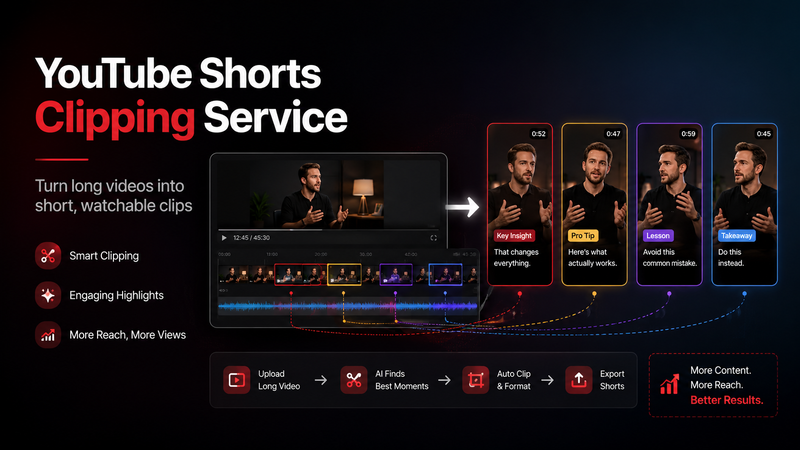

A long video is rarely just one piece of content.
It may look like one upload from the outside, but inside that video there are usually several smaller moments waiting to be used. A podcast might have a strong opinion halfway through the conversation. A webinar might include a simple answer to a question people ask all the time. A tutorial might explain one mistake in a way that is clearer than the whole video title. A founder interview might have one honest line that says more about the brand than a polished campaign ever could.
The problem is that these moments are easy to miss once the full video is published.
Most people are not going to search through a 45-minute podcast or an hour-long webinar to find the best part. Even if the content is useful, the format can feel too heavy for a new viewer. That does not mean the long video has failed. It simply means the strongest moments need to be pulled out and shared in a format people can watch quickly.
This is where a Youtube Shorts Clipping Service becomes useful. It helps creators, podcasters, agencies, coaches, founders, and brands turn long-form videos into short, focused clips that are easier to watch, easier to share, and easier to discover.
The goal is not to create more noise. The goal is to get more value from content that already exists.
Long Videos Are Built for Depth
Long-form content still matters. In many cases, it is the format where trust is built.
A podcast gives people time to hear the full conversation. A webinar gives a brand room to teach, explain, and answer questions. A tutorial allows the creator to walk through a process properly. A case study can show the full story behind a result. A livestream can capture natural reactions and unscripted ideas that would never appear in a polished video.
That depth is valuable.
The issue is that long-form content often asks for a lot of attention upfront. A viewer who already trusts the creator may watch the full video. A new viewer may not. They may like the topic, but they still need a quicker reason to care before they commit to the longer version.
YouTube Shorts can create that first reason.
A good Short gives the viewer a small sample of the full content. It can show the creator’s voice, expertise, humor, teaching style, point of view, or personality in less than a minute. If the clip is useful or interesting, the viewer may visit the channel, subscribe, or watch the full video later.
The long video builds depth. The Short creates the first touchpoint.
The Best Shorts Are Usually Already Inside the Main Video
Many creators make the mistake of treating Shorts as a separate content burden. They think they need to create new short-form ideas every day, which quickly becomes exhausting.
But often, the best Shorts are already sitting inside the videos they have recorded.
A podcast episode can contain several short clips. A webinar can become a series of practical takeaways. A tutorial can be broken into small tips. A product walkthrough can be turned into feature explainers. A customer interview can become trust-building short clips.
The challenge is knowing which moments are worth pulling out.
Not every part of a long video works as a Short. Some moments only make sense inside the full conversation. Others can stand on their own with very little context. The best clips usually have one clear idea, one useful takeaway, or one moment that makes the viewer want to keep watching.
This is where good clipping becomes more than simple editing. It becomes selection.
A Strong Short Needs One Clear Point
A YouTube Short should not feel like a random slice from a longer video. It should feel like a complete mini-idea.
If the clip is about a mistake, keep it about that mistake. If it is about a tip, keep the clip focused on that tip. If it is about an opinion, let the opinion lead the clip. If it is answering a question, make sure the question or problem is clear enough for the answer to matter.
Trying to fit too much into one Short usually weakens the clip. Viewers should not have to work hard to understand what is happening.
A good Short may be built around:
One practical tip
One common mistake
One useful explanation
One strong opinion
One quick story
One surprising answer
One before-and-after moment
One simple lesson
One clear product benefit
The clearer the idea, the easier the clip is to watch, title, caption, and share.
This matters because YouTube Shorts move fast. Viewers decide quickly whether a clip is worth their attention. If the clip takes too long to get to the point, or if the point is buried under too much setup, people will leave before the best part arrives.
Clipping Is Not Just Cutting
It is easy to cut a video. It is harder to turn that cut into something people actually watch.
A weak clipping process usually starts with timestamps. Someone finds a section that seems interesting, cuts it, crops it vertically, adds captions, and posts it. Sometimes that works. Often, it feels incomplete.
A strong clipping process starts with the viewer.
The person reviewing the video should ask: would this moment make sense to someone who has not watched the full video? Does it have a clear idea? Does it start at the right point? Is there enough context? Does it end with a proper payoff? Is the clip useful, interesting, entertaining, or memorable?
Those questions matter because YouTube Shorts are not just smaller versions of long videos. They need to stand alone.
A clip that makes sense inside a full podcast may feel confusing when seen alone. A webinar answer may need the original question included. A tutorial tip may need the problem shown first. A product clip may need a quick setup before the feature makes sense.
The edit is important, but the judgment behind the edit is what makes the clip work.
What Types of Long Videos Can Become Shorts?
Many types of long-form content can be turned into YouTube Shorts if the source material has strong moments.
Podcasts are one of the easiest sources because conversations naturally create opinions, stories, disagreements, humor, and useful answers. A single episode can often produce multiple clips if the conversation has enough clear moments.
Webinars can work well when the clips focus on practical explanations, common questions, and useful takeaways. The weaker webinar clips are usually the ones that feel like long slide sections. The stronger ones feel like clear answers.
Tutorials can become short tips, beginner mistakes, quick fixes, simple walkthroughs, or before-and-after demonstrations. These clips work best when the viewer can understand the problem quickly.
Interviews can produce strong Shorts when the guest says something honest, surprising, useful, or emotionally clear.
Business videos can become Shorts when they answer a customer question, explain one benefit, show a process, or make one strong point about the market.
Livestreams can also work because they often include natural reactions, audience questions, unscripted thoughts, and real-time commentary.
The format is less important than the moment. A simple explanation can outperform a flashy clip if it solves a real problem.
Captions, Framing, and Pacing Matter
A YouTube Short is usually watched on a phone, so the visual format matters more than people think.
If the original video is horizontal, it needs to be reframed properly. The speaker’s face should not be cut awkwardly. If there are two speakers, both should be shown in a way that makes sense. If the video includes screen recording, the important details should still be readable. If the clip includes slides, the text should not be too small.
Captions can also make a big difference, especially for podcasts, interviews, tutorials, and webinar clips. Many people watch short-form content with the sound low or off at first. Captions make the clip easier to follow and can help keep attention.
However, captions should support the clip, not take over the screen. If they are too big, too fast, or too busy, they can make the video feel messy.
The same is true for pacing. A clip should move quickly enough to keep attention, but not so quickly that the idea becomes hard to understand. The goal is not to make every clip loud. The goal is to make the content easy to watch.
Why Brands and Creators Outsource Shorts Clipping
A creator can make Shorts manually. A brand can assign someone internally. The issue is consistency.
Clipping takes more time than it looks. Someone has to review the source video, find strong moments, decide where each clip starts and ends, reframe it vertically, add captions, export the file, write a title or caption, upload it, and check performance.
Doing this once is manageable. Doing it every week across podcasts, webinars, interviews, tutorials, and brand videos can quickly become a lot.
Outsourcing helps because it separates the main content from the repurposing process. The creator records the long-form video. The clipping team finds and packages the best moments.
There is also value in outside perspective. Creators are often too close to their own content. They may think the most detailed part is the most valuable, while a new viewer may respond better to a simple thirty-second explanation. A good clipping team watches like the audience, not like the person who recorded the video.
That fresh view can make the clips stronger.
What to Look For in a YouTube Shorts Clipping Service
A good clipping service should understand short-form behavior, not just editing software.
It should know how to choose moments, format videos for mobile, write or prepare clean captions, keep clips focused, and avoid making every video look the same. It should also understand that not every Short needs heavy editing.
Sometimes a clip needs fast pacing. Sometimes it needs a clean crop and captions. Sometimes it needs the speaker’s face and the screen shown together. Sometimes it needs a stronger opening. Sometimes the best choice is to not clip a section at all.
A good service should be able to explain why a clip was selected. Was it chosen because it teaches something useful? Because it creates curiosity? Because it answers a common question? Because it can lead viewers toward the full video? Because it shows personality or authority?
That reasoning matters because clipping without strategy becomes noise.
Shorts Should Lead Somewhere
A YouTube Short can perform well on its own, but it becomes more useful when it supports a larger content plan.
A Short can lead viewers toward a full podcast episode. It can promote a longer tutorial. It can bring attention to a webinar replay. It can introduce a product explanation. It can test whether an idea deserves a deeper video later.
This is why Shorts should not be treated as random leftovers. They should be part of the larger content journey.
For creators, Shorts can help new viewers discover the channel. For brands, they can help turn existing content into ongoing visibility. For educators, they can make practical lessons easier to find. For podcasters, they can turn long conversations into regular social content.
The best use of Shorts is not just reach. It is reach that connects back to the bigger content system.
Final Thoughts
A long video should not do all the work by itself. If a podcast, webinar, tutorial, interview, livestream, or brand video contains useful moments, those moments deserve more than one chance to be seen.
A YouTube Shorts clipping service helps turn long-form content into short, focused clips that can reach people who may never click the full video first.
The full video gives people depth. The Short gives them the reason to start watching.
For creators and brands already investing in long-form content, clipping is one of the simplest ways to get more value from work that has already been done.

Comments
No comments yet. Be the first to comment!